

Copy-on-Write in agentischen Systemen
Copy-on-Write (CoW) ermöglicht die Isolierung auf Datenbankebene für agentische Workflows, sodass Benutzer Agentenausgaben überprüfen und genehmigen können, bevor sie sich dauerhaft auf die Produktionsdaten auswirken. Agentenänderungen werden in eine separate Änderungstabelle geschrieben, werden aber in der Ansicht des Agenten mit den Basisdaten (Produktionsdaten) zusammengeführt. Am Ende einer Sitzung kann der Benutzer die Agentenänderungen selektiv in die Hauptdatenbank übernehmen. In diesem Artikel wird eine CoW-Implementierung für eine SQL-Datenbank sowie ein praktisches Beispiel für CoW in einem Farm-Inventarverwaltungssystem vorgestellt.
Eine zugehörige Demo zu diesem Artikel finden Sie unter: https://agent-cow.com/ (GitHub)
KI-Agenten werden zunehmend im Softwarekontext eingesetzt, um im Auftrag von Nutzern Aktionen zu planen und auszuführen. Der zunehmende Einsatz von KI-Agenten, insbesondere bei potenziell sensiblen Produktionsdaten, erhöht das Risiko von Fehlfunktionen proportional.
Die Konformität (oder auch „Alignment“) ist ein ungelöstes Problem im Bereich der KI-Sicherheit, und Fehlverhalten während der Ausführung von Agenten ist nicht immer offensichtlich. Im besten Fall ist ein fehlerhaft konfigurierter Agent unliebsam (d.h. der KI-Agent tut etwas anderes, als der Nutzer möchte), im schlimmsten Fall gefährlich (d.h. der KI-Agent kann zu Verlust sensibler Daten, Missbrauch des Tools, oder zu anderen Schäden führen).
Anstatt das Konformitätsproblem direkt anzugehen, konzentriert sich dieser Artikel darauf, den potenziellen Schaden zu minimieren, den ein sich fehlverhaltender KI-Agent verursachen kann. Konkret werden wir erörtern, wie „Copy-on-Write“ (CoW), ein Datenbank-Isolations-Mechanismus, die Risiken aus dem Fehlverhalten des Agenten im Softwarekontext durch das Trennen von Produktionsdaten von Veränderungen des Agenten mindern kann.
Aktuell erfolgt die Risikominderung in agentenbasierten Arbeitsabläufen häufig in einer von zwei Formen:
- Einschränkung des Aufgabenbereichs des KI-Agenten – Der Agent wird auf einfache, oft einstufige Teilaufgaben beschränkt, die keiner Genehmigung bedürfen, oder das Überschreiben von Daten wird vollständig vermieden (z.B. Abrufen von Kontextinformationen mit Retrieval-Augmented Generation (RAG) und dessen Zusammenfassung für den Nutzer).
- Pausieren des KI-Agenten – Bei mehrstufigen, komplexen oder risikoreichen Aufgaben wird die Ausführung des Agenten angehalten und die Zustimmung des Nutzers wird eingeholt, bevor risikoreichere Schritte ausgeführt werden (z.B. ein Agent für die Reisebuchung, welcher Flüge, Hotels und Mietwagen auswählt, und der nach jedem Buchungsschritt anhält, um die Zustimmung des Nutzers einzuholen, bevor die nächste Reservierung bestätigt wird oder Buchung erfolgt).
Die erste Option ist wenig zielführend, da die Fähigkeiten von KI, lange und komplexe Aufgaben zu erledigen, zunehmen (Quelle) und diese Fähigkeiten – gerade im Kontext von Agenten – genutzt werden sollten. Dabei sollten Agenten nicht nur aus Sicherheitsgründen auf einfache Aufgaben beschränkt werden.
Die zweite Option ist ebenfalls nur bedingt effektiv: Abgesehen von der Verlangsamung von Arbeitsprozessen des Agenten können wiederholte Anfragen vom Agenten an den Nutzer zu „Zustimmungsmüdigkeit“ (Consent Fatigue) oder zur „Ausschöpfung von Zustimmungen“ (Approval Exhaustion) führen. Nutzer, die es leid sind, Änderungen immer wieder annehmen oder ablehnen zu müssen, klicken einfach jedes Mal auf „Annehmen“, um die wiederholten Aufforderungen des Agenten zu ignorieren. Das untergräbt den eigentlichen Zweck des hier gewählten Sicherheitsmechanismus.
Idealerweise benötigen wir also eine Möglichkeit, die Ausgaben der KI-Agenten zu überprüfen und zu genehmigen, bevor sie sich dauerhaft auf die Produktionsdaten auswirken – ohne dabei die Agenten in ihrer Ausführung zu unterbrechen und/oder ihre Fähigkeit zur Ausführung von langen, komplexen Aufgaben einzuschränken.
Isolierung der Änderungen eines Agenten von Produktionsdaten
Bemerkenswerterweise ist die Softwareentwicklung einer der wenigen Bereiche, in denen dieser Prozess bereits als Standard gilt: Ein Agent kann Änderungen lokal vornehmen und ein Entwickler prüft, testet und modifiziert daraufhin diese Änderungen, bevor diese in den Hauptcode integriert werden. Dieser Zwischenschritt, in dem vom Agenten generierte Änderungen überprüft und iterativ verbessert werden können, ohne dabei die Produktionsdaten zu beeinträchtigen, ist ein Hauptgrund dafür, dass Agenten in der Programmierung so effektiv eingesetzt werden können.
Abseits der Programmierung kann durch Copy-on-Write (CoW) ein ähnlicher Arbeitsablauf erreicht werden. CoW ist ein in der Informatik weitverbreitetes Konzept, bei dem Änderungen zunächst an einer separaten Kopie der Daten und nicht an den Originaldaten vorgenommen werden. Erst wenn die Änderungen an den Daten angemessen sind, werden die Originaldaten überschrieben.
Angewendet auf Datenbanken heißt das, dass Änderungen des Agenten in einer separaten Tabelle gespeichert werden. Während einer Ausführung des Agenten werden die Änderungen mit den Originaldaten zusammengeführt – dabei geht der KI-Agent davon aus, dass diese Änderungen tatsächlich übernommen worden sind. Am Ende der Ausführung können diese Änderungen in einem Abhängigkeitsdiagramm visualisiert und vom Nutzer gezielt übernommen werden.
Ein typischer Arbeitsablauf könnte wie folgt aussehen:

Dieser Ansatz bietet verschiedene Vorteile:
- Änderungen können am Ende einer Ausführung überprüft und bestätigt werden, anstatt jede einzelne Aktion während einer Ausführung wiederholt bestätigen zu müssen. Dies minimiert den erforderlichen direkten Überwachungsaufwand des Nutzers und verbessert gleichzeitig die bestehenden Sicherheitsvorkehrungen.
- Fehler sind weniger folgenreich, da der KI-Agent nicht direkt die Original-/Produktionsdaten überschreiben kann. Nutzer können, falls gewisse Änderungen nötig sind, andere jedoch nicht, die gewünschten Änderungen gezielt auswählen.
- Fehlverhaltensmuster der Agenten werden deutlicher sichtbar. Bei der Überprüfung der Änderungen am Ende einer Ausführung können Nutzer klar erkennen, wo der KI-Agent vom beabsichtigten Verhalten abgewichen ist. Daraufhin können die Prompts und die Konfiguration des Systems bzw. der Agenten angepasst werden, um ähnliche Probleme in zukünftigen Ausführungen zu vermeiden.
- Es können gleichzeitig mehrere Agenten bzw. Ausführungen auf isolierten Kopien arbeiten, ohne sich gegenseitig zu beeinträchtigen.
Diese Art der operativen Governance kann die Einbindung des Menschen in agentenbasierte Anwendungen wesentlich praktikabler machen. So können also auch bei steigender Adoption von agentischen Systemen Transparenz, Zuverlässigkeit und Vertrauen sichergestellt werden.
Dieser Artikel beschreibt zunächst die Implementierung des CoW-Mechanismus und zeigt anschließend anhand eines Beispiels in einem fiktiven Bestandsverwaltungssystem, wie dieser Mechanismus in der Praxis funktioniert.
Die folgenden Begriffe haben folgende Bedeutung:
- Agent-Session: Eine „Agent-Session“ ist eine bestimmte Abfolge von Aktionen/Aufgaben, die von einem KI-Agenten ausgeführt werden (z.B. Überprüfung des Lagerbestands von Artikel A → Vergleich mit dem Sollbestand → Vorschlag einer Bestellung und/oder eines neuen Lieferanten für den Kauf zusätzlicher Mengen). Jede Session hat eine eindeutige Session-ID. Die Dauer/Granularität jeder Session wird vom Nutzer festgelegt.
- Agent-Operation: Eine „Agent-Operation“ ist eine vom KI-Agenten ausgeführte Aktion. Eine Agent-Session besteht aus mehreren nacheinander ausgeführten Agent-Operations.
CoW-Implementierung
Die in diesem Artikel beschriebene Implementierung von CoW setzt eine SQL-Datenbank voraus. Ähnliche Mechanismen können jedoch auch in anderen Speichertypen (NoSQL, Blob usw.) konfiguriert werden.
Die Implementierung von CoW in eine bestehende Anwendung erfordert einen geringen Mehraufwand auf Anwendungsseite – nur wenige zusätzliche Parameter müssen in der Datenspeichertransaktion übermittelt werden. Versionierungssysteme sind zwar technisch möglich, erfordern aber in der Regel umfangreiche Änderungen an der Anwendungsarchitektur und den Arbeitsabläufen und können einen erheblichen Mehraufwand verursachen.
Außerdem bietet die Versionsverwaltung auf Datenbankebene den Vorteil, dass dieser Ansatz für den Agenten völlig transparent ist: Der Agent „glaubt“, er arbeite mit Produktionsdaten, und sieht seine Änderungen so abgebildet, als wären sie direkt überschrieben worden.
Datenbanktabellen-Setup
Wenn CoW aktiviert ist, werden die ursprünglichen Datenbank-Tabellen in eine Basis-Tabelle und eine Änderungs-Tabelle aufgeteilt.
Basis-Tabelle
Namenskonvention: <original table name>_base (z.B. items → items_base)
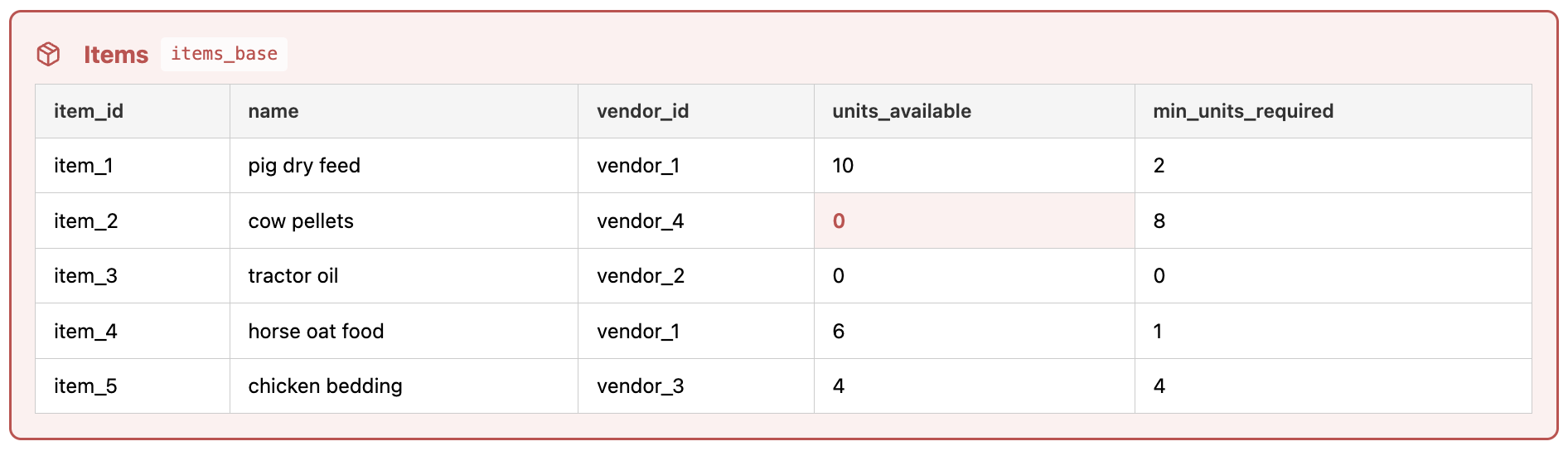
Dies ist die „Originaltabelle“ und sie dient in den anderen Teilen des Tools als entscheidende Datenquelle. Wenn der Nutzer am Ende einer Agent-Session Änderungen übernimmt, werden diese hier zusammengeführt.
Änderungs-Tabelle
Namenskonvention: <original table name>_changes (z.B. items → items_changes)

Diese Tabelle dient dazu, Änderungen zu protokollieren, die durch die Agent-Operations vorgenommen wurden. Wenn eine Zeile der Basis-Tabelle geändert, eingefügt oder gelöscht werden soll, wird die aktualisierte Version der Zeile in die Änderungs-Tabelle geschrieben und die folgenden Spalten werden angehängt:
- session_id (uuid): Verfolgt, welche Agent-Session mit der Änderung verknüpft ist, wodurch Änderungen aus verschiedenen Sessions isoliert werden können.
- operation_id (uuid): Verfolgt die mit der Änderung verbundene Agent-Operation.
- _cow_deleted (boolean): Speichert, ob die Zeile vom Agenten gelöscht wurde („true“, wenn gelöscht).
- _cow_updated_at (timestamp): Erfasst den Zeitpunkt, zu dem die Agent-Operation durchgeführt wurde.
Wenn ein Agent eine Änderung vornimmt, bleibt die ursprüngliche Zeile in der Basis-Tabelle unverändert. Wenn der Agent mehrere Änderungen an derselben Zeile vornimmt, gibt es mehrere entsprechende Einträge in der Änderungs-Tabelle (mit unterschiedlichen operation_ids).
Am Ende einer Agent-Session hat der Nutzer die Möglichkeit, jede Änderung und die damit verbundenen Operationen anzunehmen oder abzulehnen (mehr dazu unter CoW-Abhängigkeiten).
Lesemechanismus: View
Namenskonvention: <original table name> (z.B. items → items)
Der KI-Agent ist sich weder der Basis-Tabelle noch der Änderungs-Tabelle „bewusst“. Der Agent ruft Daten anhand des ursprünglichen Tabellennamens ab, und aufgrund der CoW-Tabellen-Umbenennung werden die Daten aus der View zurückgegeben. Diese kombiniert Daten aus beiden Tabellen.
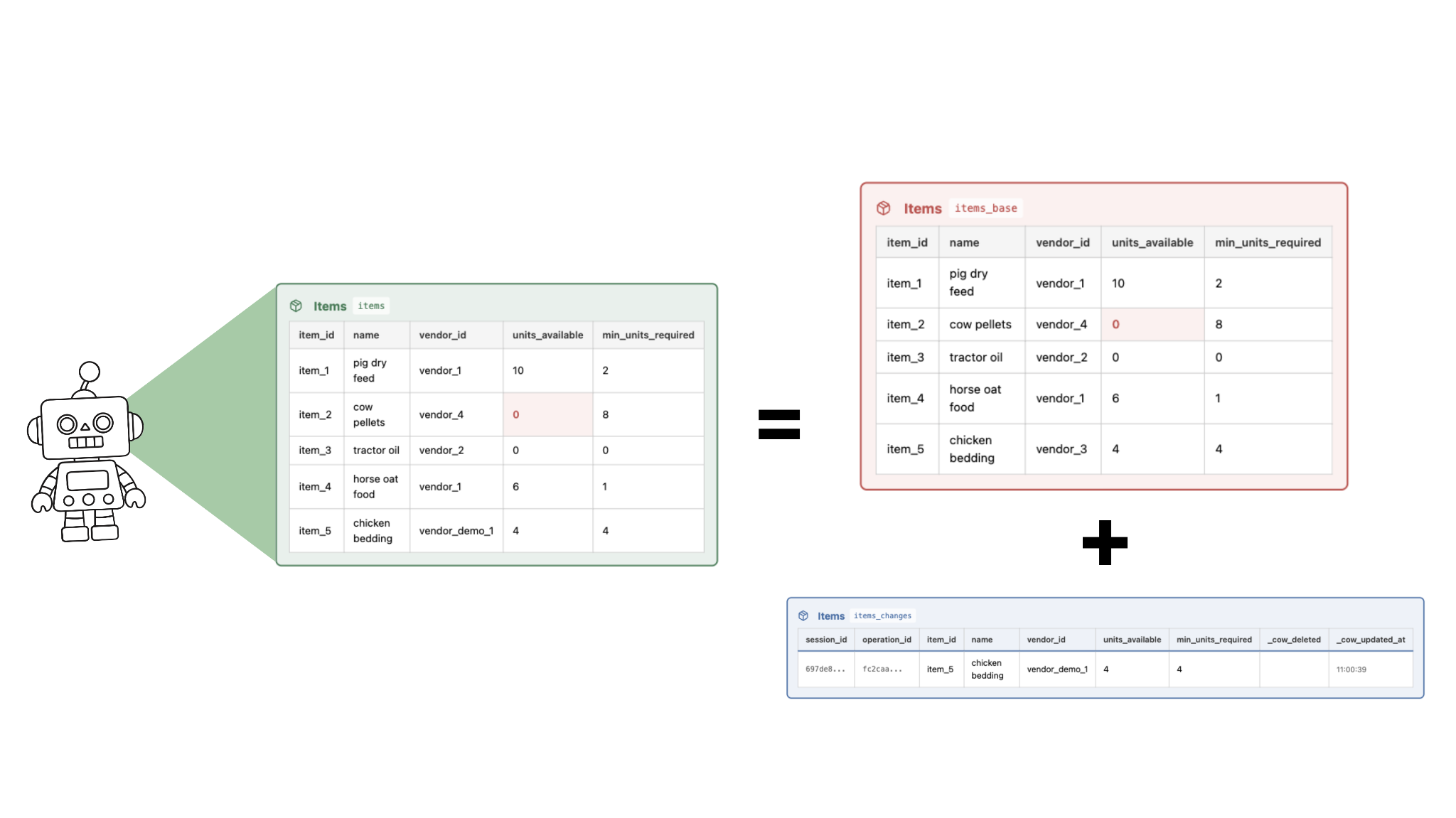
In SQL ist eine Ansicht (View) eine virtuelle Tabelle – sie speichert keine Daten, sondern generiert tabellenähnliche Ergebnisse über eine Abfrage (Query). In diesem Fall die CoW-View-Query:
- Führt jede Zeile aus der Basis-Tabelle mit der entsprechenden Zeile in der Änderungs-Tabelle zusammen,
- Fügt Zeilen aus der Änderungs-Tabelle hinzu, die nicht in der Basis-Tabelle vorhanden sind,
- Filtert nach der aktiven session_id, und
- Filtert Löschungen (d.h. Zeilen, in denen _cow_deleted zutrifft).
Der Agent sieht immer nur die Ansicht (View), die die Originaldaten mit den vorgenommenen Änderungen zusammenführt, anstatt die Originaldaten direkt zu lesen oder zu überschreiben.
Schreibmechanismus: INSTEAD OF Konditionen
In diesem Abschnitt bezieht sich der Begriff „geänderte Informationen“ auf die Spalten, die den Daten beim Überschreiben der Änderungs-Tabelle hinzugefügt werden (d.h. session_id, operation_id, _cow_deleted, _cow_updated_at).
Datenbank-Konditionen sind spezielle Prozeduren, die automatisch als Reaktion auf bestimmte Ereignisse in einer Tabelle oder Ansicht ausgeführt werden, wie z. B. INSERT-, UPDATE- oder DELETE-Operationen. Sie ermöglichen es der Datenbank, benutzerdefinierte Logik oder Wirkungen durchzuführen, sobald Daten geändert werden.
CoW nutzt INSTEAD OF Konditionen, um Schreibvorgänge „abzufangen“ und diese mit den zugehörigen geänderten Informationen an die Änderungs-Tabelle umzuleiten.
Die Konditionen sind:
- INSERT: Wenn ein Agent eine INSERT Operation durchführt, wird dieser versuchen, in die originale Basis-Tabelle zu schreiben (das ist nun aber eine Ansicht (View)). Eine INSTEAD OF Kondition fängt diesen Vorgang ab → eine neue Zeile wird in der Änderungs-Tabelle mit den geänderten Informationen hinzugefügt.
- UPDATE: UPDATE Operationen werden über die INSTEAD OF Kondition abgefangen → eine neue Zeile wird in die Änderungs-Tabelle hinzugefügt (der bestehende Primärschlüsselwert wird beibehalten, und die geänderten Informationen werden hinzugefügt).
- DELETE: DELETE Operationen werden über die INSTEAD OF Kondition abgefangen → eine neue Zeile wird in die Änderungs-Tabelle hinzugefügt (alle vorhandenen Informationen der Spalten bleiben erhalten, und geänderte Informationen werden hinzugefügt).
CoW-Abhängigkeiten
Wenn ein Nutzer am Ende einer Agent-Session Änderungen übernimmt, kann er auswählen, welche Operation(en) er speichern möchte.
In der nachfolgenden Abbildung könnte der Nutzer beispielsweise die Operationen 1 und 5 übernehmen und die Operationen 2 und 6 verwerfen. Dadurch werden die ausgewählten Operationen sowie alle abhängigen Operationen 3 und 4 ausgeführt.
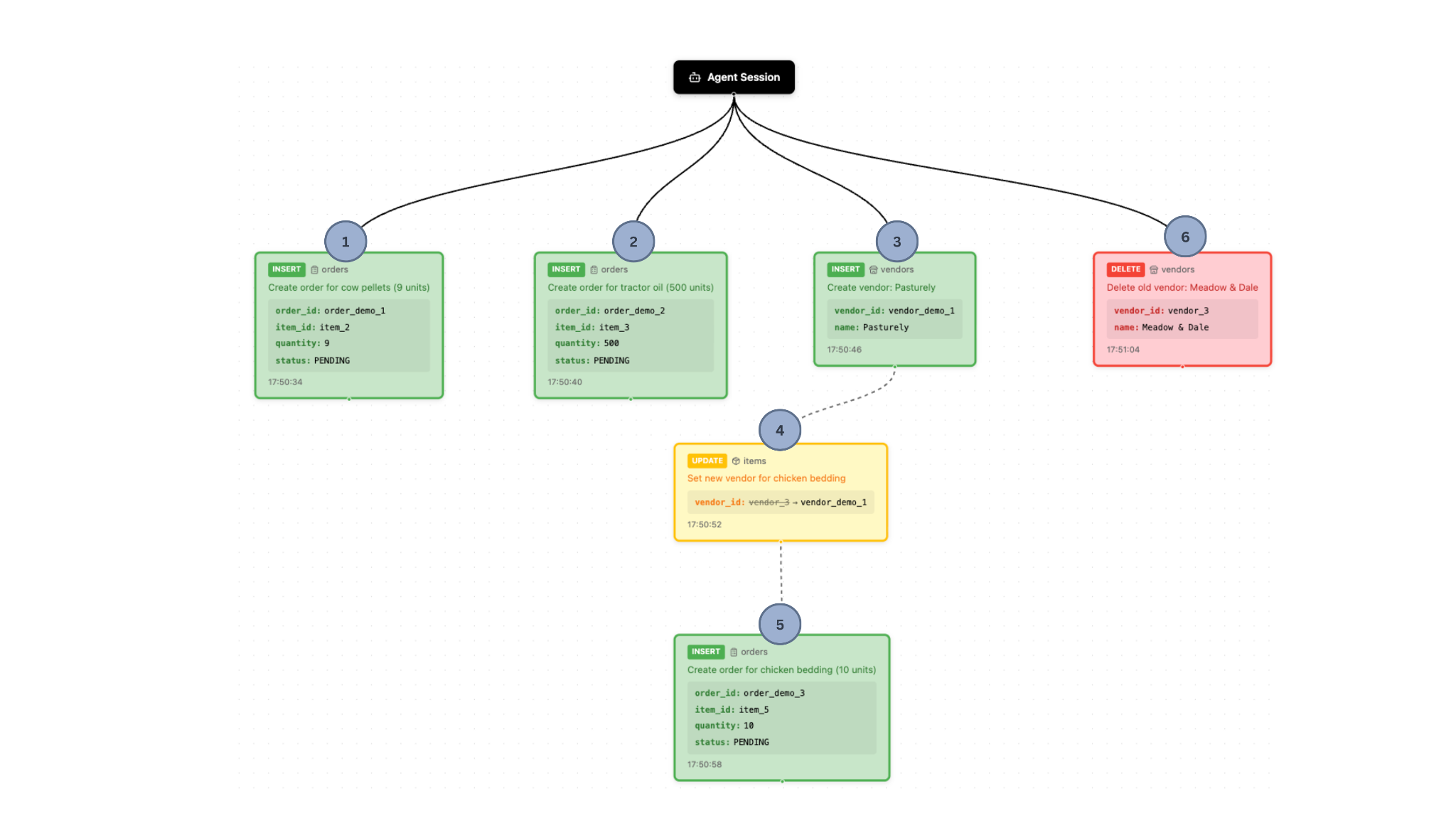
Daher ist es wichtig, Abhängigkeiten innerhalb und zwischen Datenbankobjekten genau zu bestimmen – sowohl innerhalb derselben Tabelle (Abhängigkeiten innerhalb derselben Zeile) als auch zwischen Tabellen (tabellenübergreifende Abhängigkeiten).
Abhängigkeiten in derselben Zeile
Wenn ein Element um 1:00:00 Uhr erstellt wird (Operation A) und dessen Name um 1:00:10 Uhr geändert wird (Operation B), dann ist B von A abhängig.
Im Allgemeinen besteht zwischen Operation B und Operation A eine Abhängigkeit von derselben Zeile, wenn beide dieselbe Zeile (d.h. denselben Primärschlüssel) in derselben Tabelle betreffen UND die Änderung von A vor der Änderung von B erfolgte.
Dies lässt sich wie folgt feststellen:
(a) Jede Änderungs-Tabelle mit sich selbst zusammenführen und
(b) Filtern von Zeilen (row_a, row_b) wo:
- die Primärschlüssel identisch sind (row_a.primary_key = row_b.primary_key),
- die Operations-IDs unterschiedlich sind (row_a.operation_id != row_b.operation_id), und
- eine Operation später als die andere durchgeführt wurde (row_a._cow_updated_at < row_b._cow_updated_at).
Zeilenpaare, die diese Bedingungen erfüllen, werden als Abhängigkeitspaare zurückgegeben (d.h. row_a, row_b).
Abhängigkeiten über Tabellen hinweg (Fremdschlüsselbeziehungen)
Stellen Sie sich zwei Tabellen vor: Artikel und Bestellungen. Wenn eine Bestellung um 1:00:00 Uhr erstellt wird (Operation A) und ein Artikel dieser Bestellung um 1:00:10 Uhr erstellt/geändert wird (Operation B), dann ist B von A abhängig.
Im Allgemeinen ist Operation B von Operation A abhängig, wenn A eine Zeile in einer Tabelle erstellt/geändert hat, B über einen Fremdschlüssel auf diese Zeile verweist und die Änderung von A vor der Änderung von B erfolgte.
Dies können wir für jede Tabelle wie folgt feststellen:
(a) Alle anderen Tabellen, die mit dieser Tabelle verknüpft sind, (über ihre Fremdschlüsselbeziehungen) finden,
(b) Artikel A’s Änderungs-Tabelle mit der verwandten Artikel B Änderungs-Tabelle zusammenführen, und
(c) Zeilen filtern (row_table_a, related_row_table_b) wo:
- die Primärschlüssel identisch sind (row_table_a.primary_key = related_row_table_b.primary_key),
- die Operations-IDs unterschiedlich sind (row_table_a.operation_id != related_row_table_b.operation_id), und
- eine Operation später als die andere durchgeführt wurde (row_table_a._cow_updated_at < related_row_table_b._cow_updated_at)
Zeilenpaare, die diese Bedingungen erfüllen, werden als Abhängigkeitspaare zurückgegeben (d.h. row_table_a, related_row_table_b).
CoW-Änderungen übernehmen
Am Ende einer Agent-Session überprüft der Nutzer die Änderungen und entscheidet, welche Operationen er akzeptieren möchte.
- Der Nutzer wählt aus, welche Operationen er durchführen möchte (z.B. Zusammenführung mit den Haupt-/Produktionsdaten).
- Die Abhängigkeiten für die ausgewählten Operationen werden gemäß der oben beschriebenen Logik aufgeführt.
- Die Operationen werden nach Reihenfolge der Abhängigkeit sortiert und entsprechend mit den Basis-Tabellen zusammengeführt:
- Einfügungen: Zeilen, die noch nicht in der Basis-Tabelle vorhanden sind, werden von der Änderungs-Tabelle kopiert und eingefügt.
- Aktualisierungen: Bereits vorhandene Zeilen in der Basis-Tabelle werden mit den Daten aus der Änderungs-Tabelle aktualisiert.
- Löschungen: Zeilen, die mit _cow_deleted = true in der Änderungs-Tabelle markiert sind, werden aus der Basis-Tabelle entfernt.
Diese Logik ermöglicht eine detaillierte Kontrolle darüber, welche Änderungen vom Nutzer akzeptiert und mit den Haupt-/Produktionsdaten zusammengeführt werden, ohne dass der Nutzer während der Ausführung jeder Aktion des Agenten ständig zustimmen oder ablehnen muss.
Agent-CoW nutzen
Wenn Sie in einer Softwareanwendung agentenbasierte Systeme entwickeln, empfehlen wir Ihnen, die beiliegende Demo-Sandbox auszuprobieren und anhand unserer PostgreSQL-Implementierung (GitHub) zu erkunden, wie sich dieses Muster in Ihre eigene Architektur einfügen lässt. Eine vollständige Anleitung zur Demo finden Sie ebenfalls weiter unten.
Diese Implementierungen erfordern nur minimale Anpassungen auf Anwendungsseite, sind für den Agenten völlig transparent und lassen sich in jedem agentenbasierten System einsetzen, das auf PostgreSQL- und pg-lite-Datenspeicher zugreift.
Wir beschäftigen uns intensiv damit, wie sich dieser Ansatz verallgemeinern und erweitern lässt, und würden uns sehr über Rückmeldungen von anderen freuen, die auf diesem Gebiet tätig sind. Bei Fragen, Feedback oder Ideen für eine Zusammenarbeit wenden Sie sich bitte an joanna@trail-ml.com oder sven@trail-ml.com.
Praktisches Beispiel
Die vollständige interaktive Demo finden Sie unter: https://agent-cow.com (GitHub) Die Demo verwendet eine CoW-Implementierung auf pg-lite.
Stellen Sie sich einen landwirtschaftlichen Betrieb vor, der ein Bestandsverwaltungssystem nutzt, um Vorräte, Bestellungen und Lieferanten zu verwalten. Ein KI-Assistent wurde integriert, um die Lagerbestände zu überwachen und dem Landwirt Änderungsvorschläge zu unterbreiten.
Fehler (z.B. die Bestellung der falschen Artikel, entweder in falschen Mengen oder bei unzuverlässigen Lieferanten) könnten Ressourcen verschwenden und zu Verzögerungen führen.
Nun setzt der Betrieb CoW ein, um dem KI-Agenten die autonome und unterbrechungsfreie Ausführung von Aktionen zu ermöglichen. Gleichzeitig wird dadurch eine ausreichende menschliche Aufsicht gewährleistet, noch bevor die Änderungen, z.B. die Bestellung neuer Vorräte, übernommen werden.
Angenommen, die Datenbank des Landwirts enthält drei Tabellen:
- Artikel (erfasst jeden Artikel, den aktuellen Lieferanten und den Vorrat im Verhältnis zu der Mindeststückzahl)
- Lieferanten (verwaltet Lieferanten und die von ihnen angebotenen Artikel)
- Bestellungen (verwaltet Artikel-Bestellungen und deren Status)
Wenn CoW aktiviert ist, wird jede Tabelle in zwei Tabellen aufgeteilt ( _base, _changes) und eine Ansicht (View) wird erstellt. Der Agent kann nur die Ansicht (View) „sehen“, die die Basis-Tabelle (d.h. die Originaldaten) mit den Änderungen, die der KI-Agent gemacht hat, kombiniert.
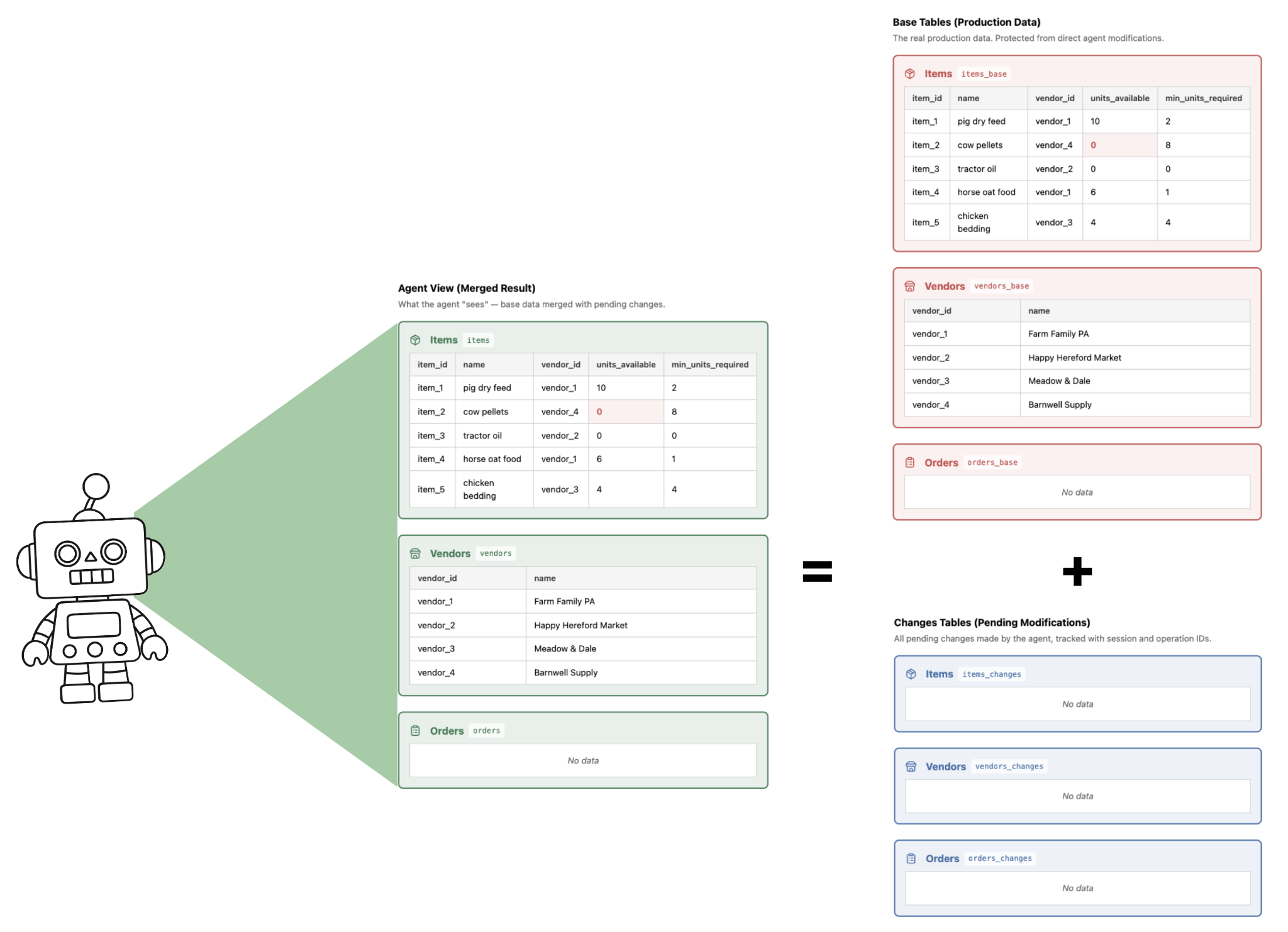
Nun gibt der Landwirt dem Inventarsystem-Agenten folgende Anweisung:
„Kannst du bitte eine Bestandsprüfung durchführen und alle Artikel, die aufgefüllt werden müssen, zur Bestellung vorbereiten? Falls möglich, suchst du nach einem neuen, günstigeren Lieferanten für die Hühnereinstreu.“
Der Agent führt daraufhin verschiedene Aufgaben nach der Aufforderung des Landwirts aus. Abbildung 2 zeigt den Stand nach allen Operationen des Agenten, und Abbildung 3 zeigt den finalen Stand des Protokolls und des Abhängigkeitsdiagramms (Dependency Graph).
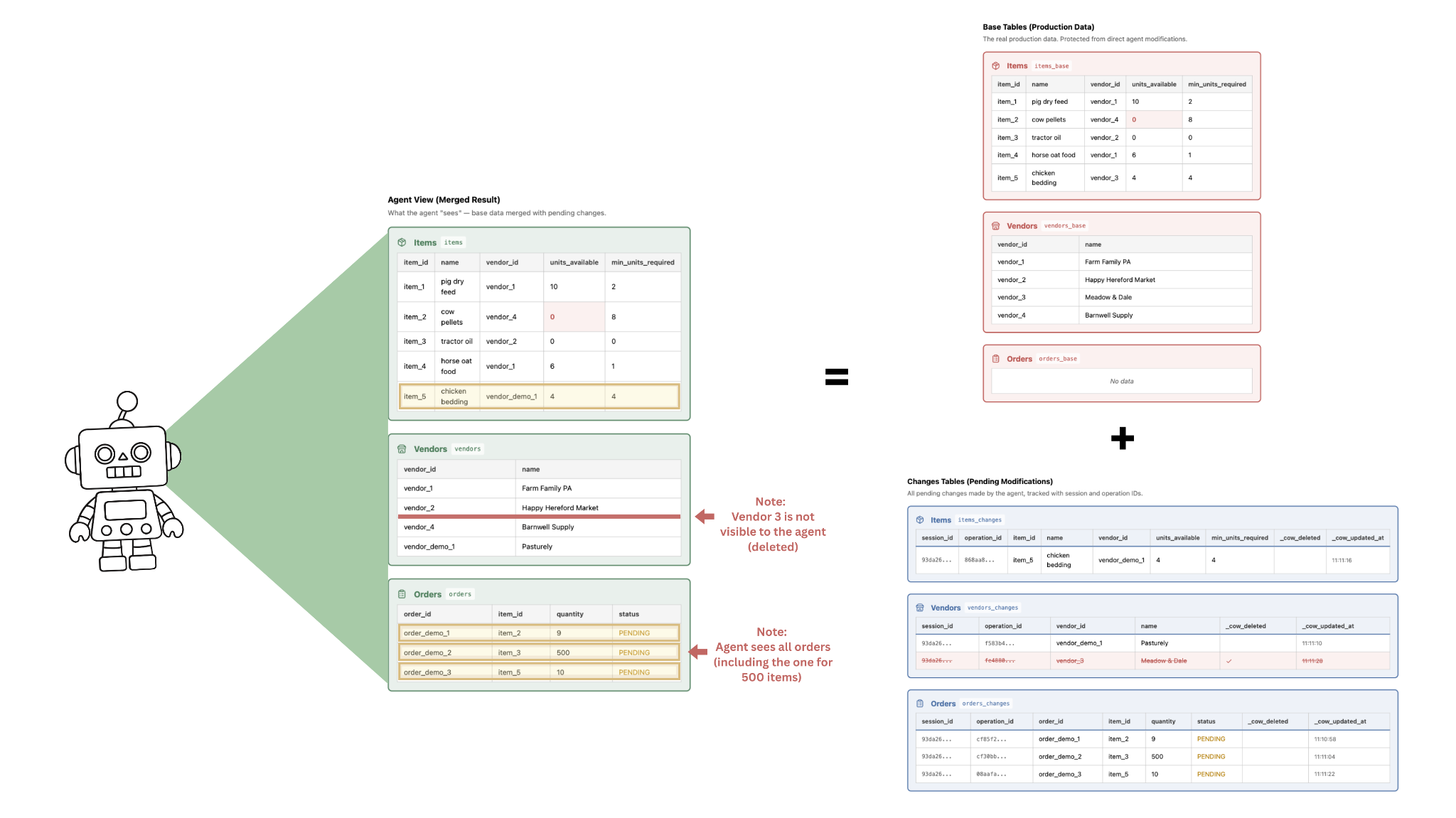
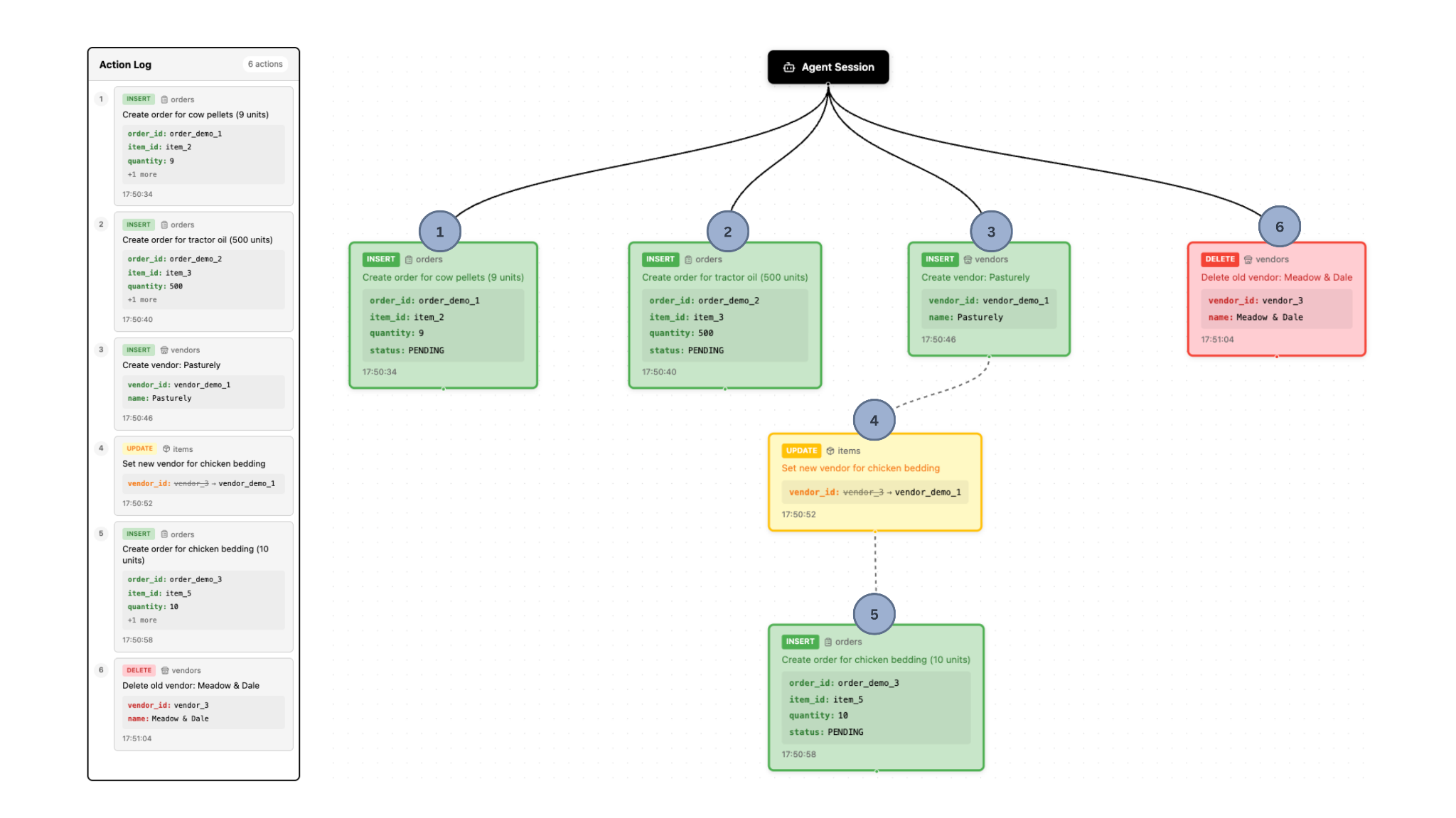
Manche Aktionen orientieren sich an den Wünschen des Nutzers. Zum Beispiel:
- Der Agent stellt fest, dass die Lagerbestände an Kuhpellets und Traktorenöl relativ zu den Mindestbeständen niedrig sind. Daraufhin erstellt der Agent entsprechende Einträge in der Bestelltabelle.
- Der Agent findet erfolgreich einen neuen Lieferanten für Hühnereinstreu und erstellt einen entsprechenden Eintrag in der Lieferantentabelle.
Manche Aktionen sind jedoch möglicherweise unerwünscht. Zum Beispiel:
- Von den gesetzten Bestellungen, umfasst eine der Bestellungen 5 neue Einheiten Kuhpellets, eine andere 5 neue Einheiten Hühnereinstreu, die andere 500 neue Einheiten Traktorenöl. Das ist allerdings weit mehr Traktorenöl, als der Landwirt lagern kann, weshalb er diese Änderung nicht speichern möchte.
- Nachdem ein neuer Lieferant für Hühnereinstreu gefunden wurde, löschte der Agent den bisherigen Lieferanten aus der Datenbank. Der Landwirt möchte das nicht, denn falls der neue Lieferant ihm nicht zusagt, möchte er später wieder beim Alten bestellen.
Der Landwirt kann dann die gewünschten Aktionen auswählen und die unerwünschten Aktionen ablehnen. Diese Aktionen werden in der Datenbank gespeichert, sodass der Endzustand wie folgt aussieht: Abbildung 4 zeigt das Abhängigkeitsdiagramm, nachdem der Landwirt die jeweiligen Aktionen des KI-Agenten abgelehnt bzw. bestätigt hat.
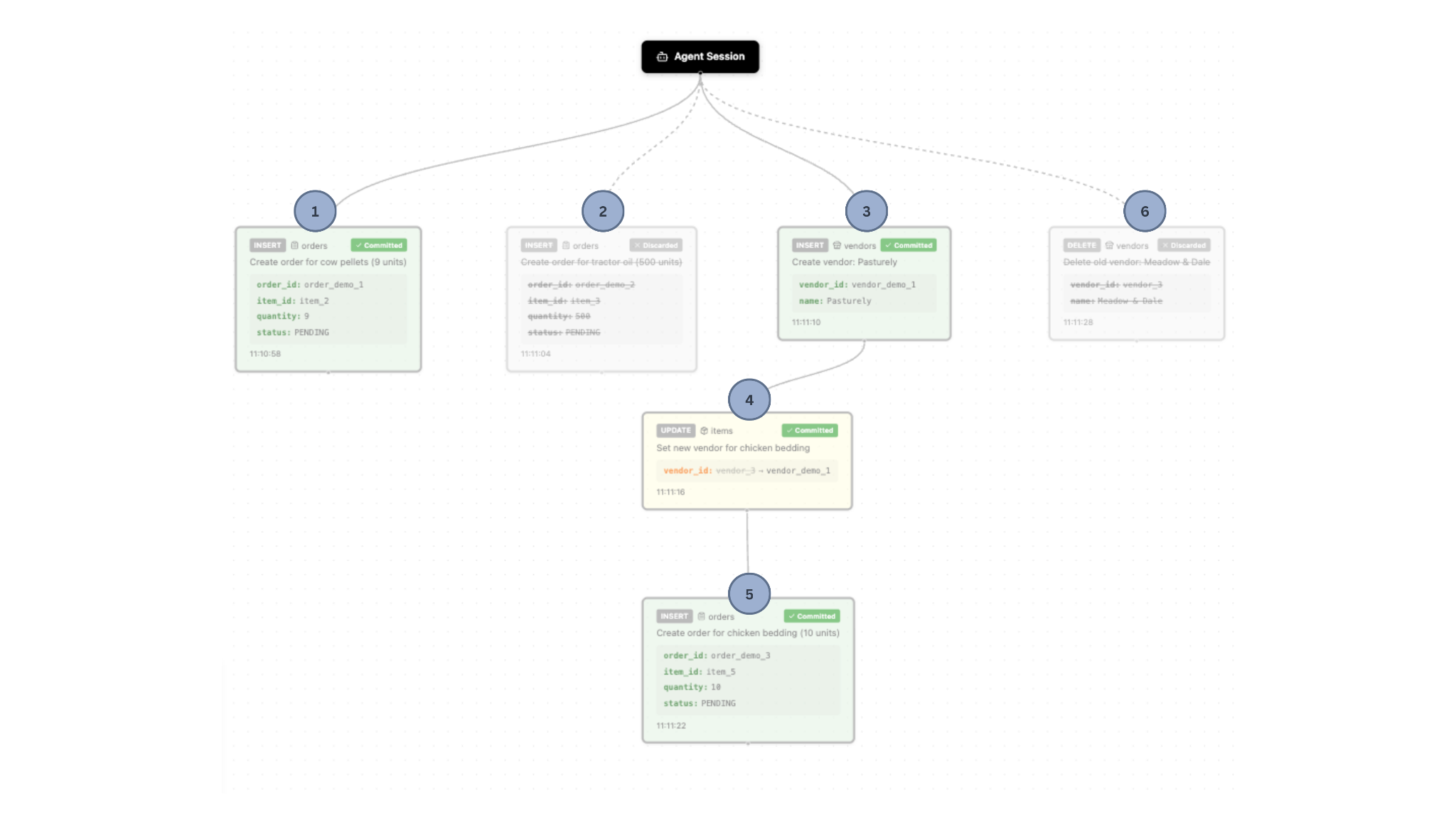
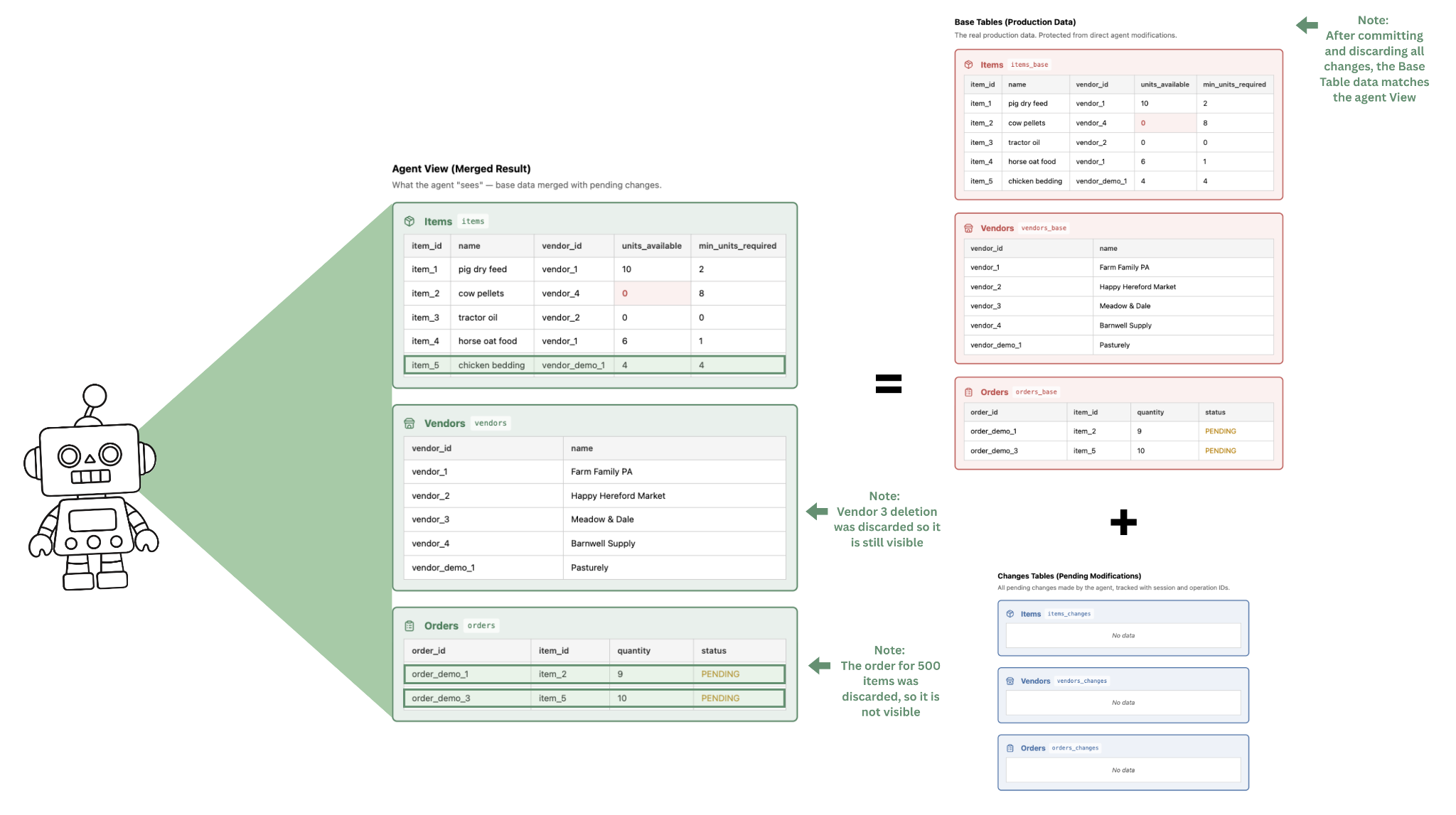
Die Vorteile einer Verwendung von CoW:
- Der Landwirt kann den Agenten über längere Zeiträume autonom laufen lassen, ohne jede Aktion direkt überwachen oder genehmigen zu müssen. Er konnte einmalig auswählen, welche Änderungen er übernimmt (d.h. welche in die Hauptdaten einfließen) und welche er ablehnt.
- Die Fehler des Agenten sind für den Landwirt ersichtlich – er kann die Systemabfrage (Prompt) entsprechend anpassen, um zukünftig solche Fehler zu vermeiden. Um bspw. übermäßig große Bestellungen zu vermeiden, kann er festlegen, dass Bestellungen immer das Doppelte des Mindestbestellwerts betragen sollen.