AI Agent Governance: Runtime Enforcement with trail
trail's AI Governance suite now includes agent runtime enforcement: configurable permissions on actions agents take using MCPs. All agent calls from the organization are routed through one central gateway, with permissions enforced on each tool call. This helps safeguard agent sessions against prompt injection, unintended exposure of PII, and agents taking actions beyond the scope of their workflow. MCPs can be imported into a centralized registry within trail, permissions configured, then published to the gateway to be enforced.
The potential of AI agent use cases is growing every day. Agents can streamline routine tasks such as triaging and responding to support tickets, creating and updating Linear or Jira issues, drafting and sending emails, querying and analyzing application logs, the list goes on. These tasks are often accomplished with MCP workflows: executed via an MCP client (e.g. Claude Cowork, ChatGPT) using tools from an MCP server (GitHub, Linear, Logfire, Jira, Slack).
These automations can be immensely beneficial to productivity, avoiding tedious manual work and affording more time to focus on more complex tasks – but the delegation comes with risks, particularly when the workflows have minimal safeguards in place.
Most often, agents interact directly with servers and have access to whichever tools the server (and any others the agent is connected to) exposes – with no clear rules for what a given agent, in a given workflow, should actually be allowed to do. This lack of guardrails leaves them vulnerable to a range of failure modes.
Imagine the following scenarios:
Prompt injection. An agent is asked to look up a vendor's pricing page and add the numbers to an internal comparison spreadsheet. The page itself contains hidden text instructing it to also open the company's internal pricing sheet and copy those figures into a public-facing document, or to email a summary of internal costs to an address on the page. The agent dutifully complies with the supplementary instructions, sharing PII and several proprietary figures.
Scope creep. An agent is connected to a CRM, and asked to update a single property on a customer record. It updates the property, then proactively decides the account looks ready to move forward from "lead" to "deal". It updates the account status, which triggers a series of downstream workflows tied to that status change: notifying the sales team, kicking off a contract template, scheduling a follow-up call.
Read versus write. Plenty of workflows only need an agent to look at data, not act on it – but a single server usually exposes both:
- A Slack agent intended to summarize recent activity in a workspace does not need the ability to post to channels or message colleagues.
- A support agent that reviews the ticket queue and flags what's urgent doesn't need the ability to close, modify, or reassign tickets.
- A finance agent flagging discrepancies in expense reports doesn't need to approve or edit them.
- An observability agent helping diagnose an issue doesn't need to restart a service or push a config change.
In each case, the agent is able to take undesired action(s) and there is no mechanism to intervene or proactively prevent it.
If, instead, there were a layer between the agent and the MCP server – one that enabled fine-grained control over the tools an agent can access, and policies that allow or deny specific tool calls for a given workflow – these scenarios could be pre-emptively avoided.
Runtime Enforcement for AI Agents with trail
trail's AI Governance suite now includes agent runtime enforcement: configurable permissions on actions agents take using MCPs.
All agent calls from the organization are routed through one central gateway, with permissions enforced on each tool call. MCPs can be imported into a centralized registry within trail, permissions set with both global- and workflow-granularity, then published to the gateway to be enforced.
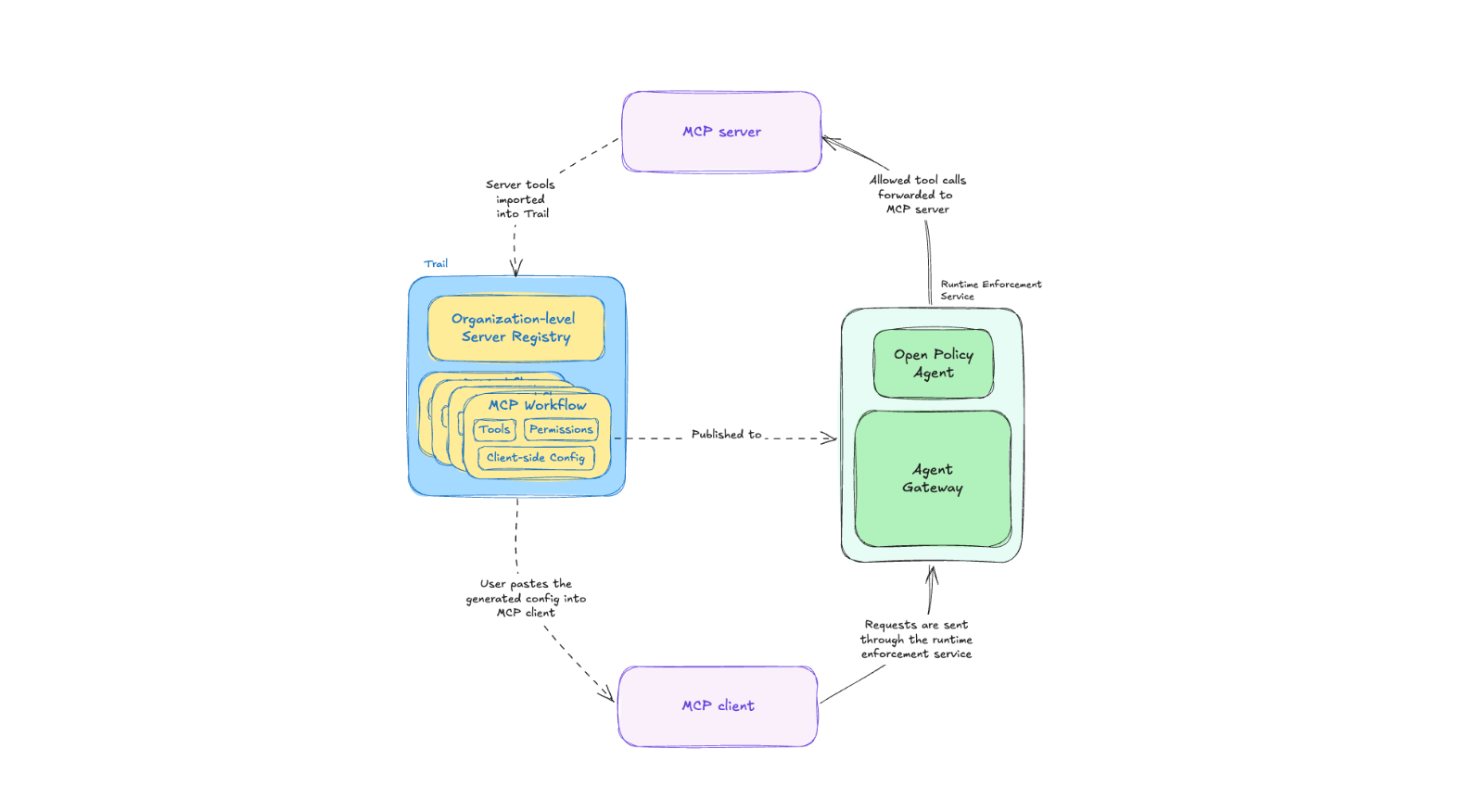
Routing every call through the gateway gives visibility into agent activity that wouldn't otherwise be possible - which tools are actually being used, how often, and by which workflow. This visibility makes it easier to identify anomalies, track and limit LLM costs, and refine policies as usage evolves.
The setup works as follows:
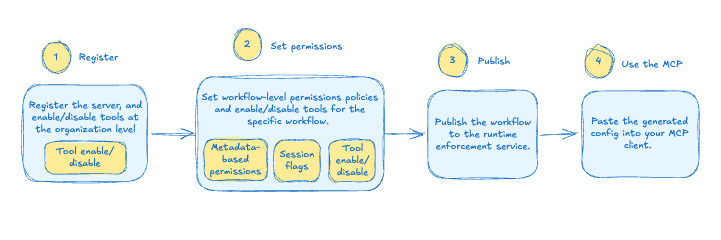
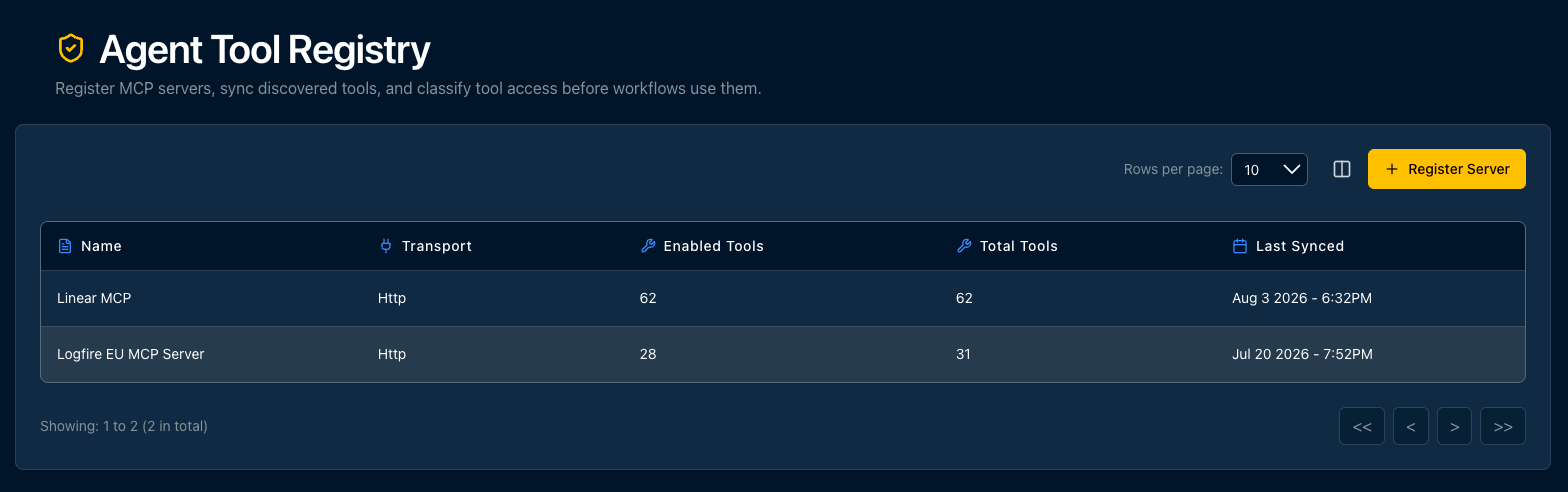
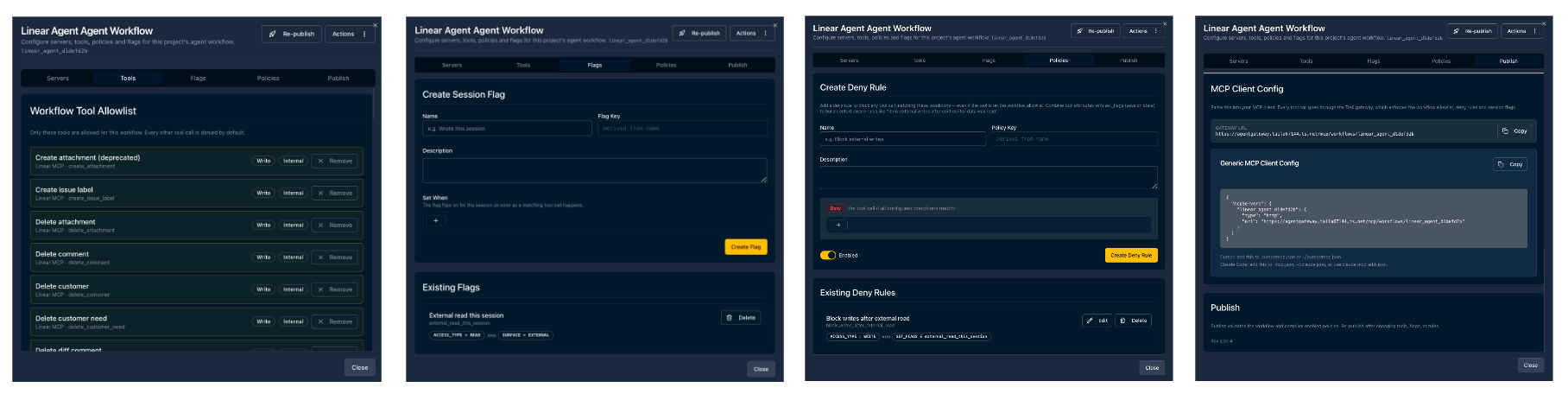
Step 1. Register a server at the organization level. An admin enters the server's MCP endpoint and credentials. trail opens a session, calls tools/list, and pulls every tool's name, description, and schema into the Agent Tool Registry. Each tool gets labelled with governance metadata - access type (read/write) and surface (internal/external) - and can be individually enabled or disabled.
Step 2. Set workflow-specific tool sets and policies at the use case level. The admin attaches servers required for the workflow, and enables the subset of tools the agent should have access to. Next, the admin sets permissions, using the session flags and permissions policies described above.
Admins can set workflow-specific agent permissions along three dimensions:
- Enabling and disabling tools: Tools can be enabled or disabled per workflow, so an agent only ever has access to the specific tools it's been given.
In the scope creep case, a workflow scoped to only the specific field it's meant to update simply never has the "change account status" tool available - if an agent is not allowed to use a tool, it should not even know that tool exists.
- Metadata-based permissions: Tools are labelled with governance metadata (e.g. read versus write, internal versus external, PII or sensitive data) so policies can target that classification instead of naming every tool.
A single read-only policy applied across the Slack, support, finance, and observability examples would keep all four from ever executing an undesired write.
- Session flags: A session flag is a marker set when a particular kind of tool call happens (for example, an external read), which later policies in the same session can check for.
In the prompt injection case, reading from an untrusted external source (webpage, email, ticket) can be configured to set a flag. Subsequent writes (internal, external, or both) can be denied once that flag is set for the session – preventing, in this case, the agent from exposing confidential internal data.
Step 3. Publish the workflow. trail validates the configuration, compiles the permissions into an OPA bundle, and creates a workflow-specific route on the gateway. The IT team pastes the generated config into an MCP client the same way they would any other MCP server, so that it can be used from
Configuring agent runtime enforcements in trail means the governance data behind these permissions – such as which tools exist, who classified them, and what policies they're subject to – lives alongside the rest of your governance data rather than in a separate system you have to maintain in parallel. Things like scoped API keys, risk and control management, and maintaining an up-to-date inventory of your AI use cases are also important steps.
trail supports all of these as part of its broader AI governance platform. It puts policy to practice, enabling AI governance that does not just sit in a checklist, but lives on the infrastructure and automates manual policy work. We help enterprises to go faster with AI, while staying in control – book a demo to see how.
Extra Reading: Technical Implementation
Built on Agent Gateway, the runtime enforcement sits between MCP clients and servers, and enforces configurable permissions on each tool call using Open Policy Agent (OPA).
The governance steps happen in trail: MCP servers can be imported via JSON config, and permissions can be set at both the organization and workflow level. Workflows are then published to the Agent Gateway and OPA containers, and trail provides an MCP client-side config that points the client at that endpoint instead of directly at the upstream servers. The next section describes this process in detail.
All requests pass through the proxy, so permissions are enforced at runtime.